
AIM Intelligence Studio Theme Pack — 9 Ecommerce & Blogging Designs
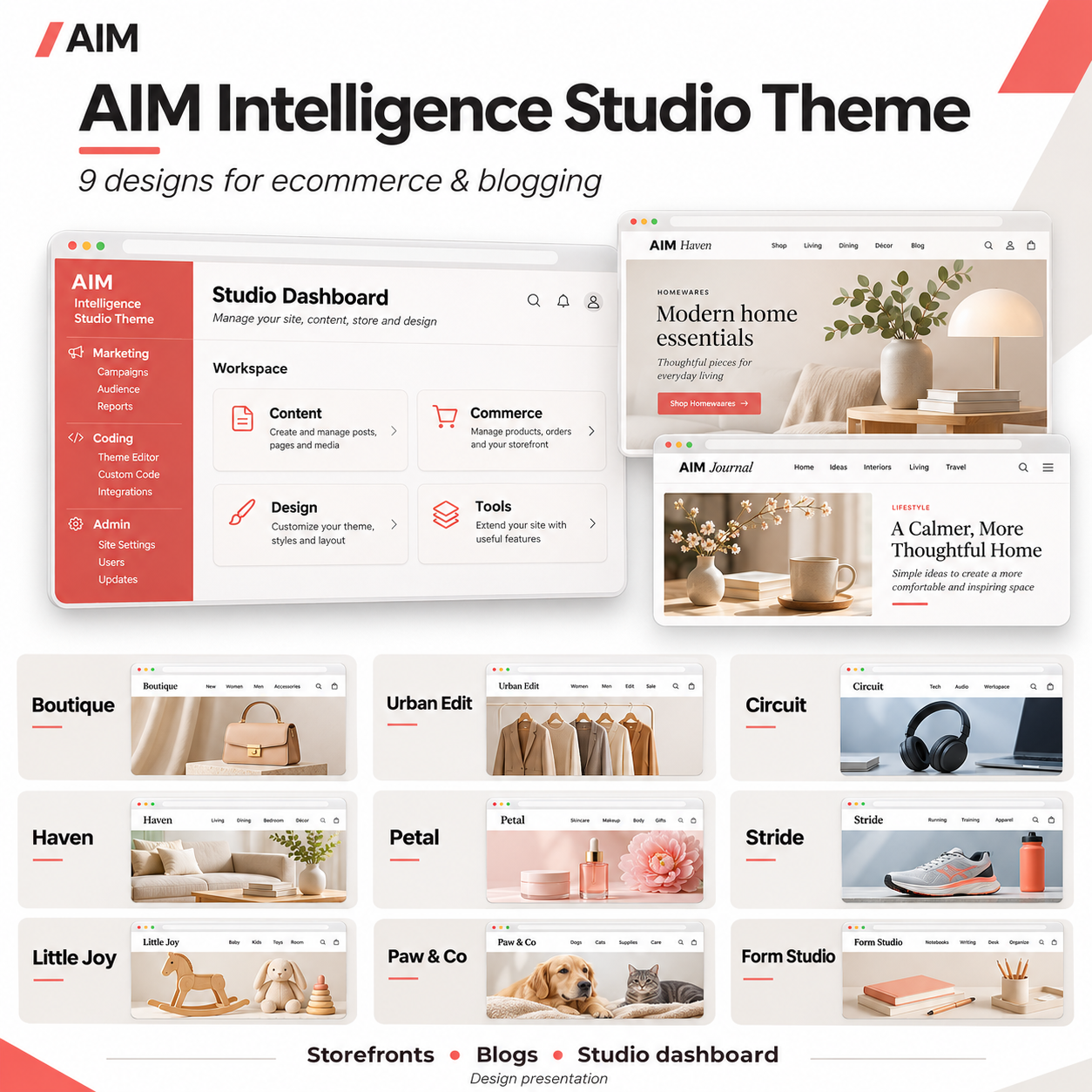
Build your online shop and journal with a collection of nine responsive WordPress themes. Each design includes ecommerce presentation templates, native WordPress blogging layouts and the embedded AIM Intelligence Studio Theme dashboard, with grouped Marketing, Coding and Admin navigation.
Nine distinct storefront and blog designs. One organised Studio dashboard.
See the tool
Short description
Build your online shop and journal with a collection of nine responsive WordPress themes. Each design includes ecommerce presentation templates, native WordPress blogging layouts and the embedded AIM Intelligence Studio Theme dashboard, with grouped Marketing, Coding and Admin navigation.
Full description
Choose the design that suits your business, add your own branding and manage your website through a shared Studio dashboard. This pack brings together nine individually installable WordPress themes for independent retailers, dropshippers, publishers and businesses combining product sales with editorial content.
Each theme pairs a distinct public storefront style with journal, article, archive and search templates. Behind the scenes, the embedded AIM Intelligence Studio Theme dashboard helps you find your content, design settings and installed tools in one organised workspace.
AIM Engine is the separate core AI platform. Download and install AIM Engine first, then complete your account and connection setup to connect your website with the AIM AI developer community. The theme pack supplies website and dashboard designs; AI generation and shop operations use their separately configured plugins.
THE NINE INCLUDED DESIGNS
1. Boutique — general retail and lifestyle; warm cream and forest-green styling.
2. Urban Edit — fashion and accessories; bold typography and sharp editorial treatments.
3. Circuit — technology and gadgets; crisp blue styling for products and explainers.
4. Haven — home and interiors; warm natural colours and an editorial presentation.
5. Petal — beauty and personal care; soft colours and rounded forms.
6. Stride — sports and outdoors; strong typography and an energetic palette.
7. Little Joy — toys and family; playful colours and friendly shapes.
8. Paw & Co — pet accessories; warm, welcoming product and article layouts.
9. Form Studio — gifts, stationery and design; a minimal editorial style.
ECOMMERCE PRESENTATION
- Dedicated store homepage and responsive product cards.
- Product detail and gallery presentation for compatible AIM shop listings.
- Store identity using your own name, logo, colours and contact information.
- Compatibility with the separate AIM Dropship Importer and Image Studio.
- Multi-product cart and embedded Stripe Checkout through the separate checkout plugin.
- Delivery presentation supplied by the configured checkout plugin.
BLOGGING FEATURES
- Journal index with excerpts, featured images and pagination.
- Individual articles with date, author, categories and tags.
- Category and date archives, search results and navigation between posts.
- WordPress comments when enabled.
- Feed links, responsive embeds and block styling support.
- A separate Journal page alongside the storefront homepage.
AIM INTELLIGENCE STUDIO THEME DASHBOARD
- Light workspace design with coral accents and responsive cards.
- Grouped Marketing, Coding and Admin navigation.
- Activity workspaces for content, commerce, design, tools and other registered sections.
- Discovery of registered WordPress and installed plugin screens.
- Supported staff and app-access management, subject to existing permissions.
- Active theme name displayed in the workspace.
- Temporary native WordPress administration view and a setting to disable dashboard replacement.
MAIN BENEFITS
Choose from nine styles without buying separate design packs. Keep your storefront and editorial content visually consistent, organise administration around your work, and extend your website using compatible AIM tools.
WHO IT IS FOR
Independent online shops, dropshippers, bloggers, niche publishers and businesses selling products while publishing helpful articles. Each website uses its own identity, content, accounts and settings.
WHAT THE PACK INCLUDES
Nine separately installable theme ZIPs, arranged in named folders. Each folder contains a theme, its individual listing description, a user guide and a static storefront preview. The collection also includes a start-here installation guide. No developer reports or test files are included.
IMPORTANT FIRST STEP
Download, install and activate AIM Engine FIRST. Complete your own account and connection setup for the AIM AI developer community. Installing a theme alone does not connect an account or enable AI generation.
INSTALLATION
1. Download and install AIM Engine first and complete its connection setup.
2. Extract the theme pack on your computer.
3. Choose one design and find its inner installable theme ZIP.
4. In WordPress, open Appearance > Themes > Add New > Upload Theme. Upload that inner ZIP and activate it.
5. Configure your store name, logo, colours, navigation and contact details.
6. Install and configure the separate importer/image studio and checkout plugins if using ecommerce features.
7. Use Appearance > Store setup to create the compatible shop pages.
8. Create a Journal page and assign it as the Posts page in Settings > Reading, with a static Home page.
9. Check the website and any payment flow on staging before launch.
Only one theme can be active on a WordPress site at a time. The outer collection ZIP is a download bundle, not a directly installable theme. Existing Studio preferences are retained when switching between these variants.
REQUIREMENTS AND DEPENDENCIES
WordPress 6.6 or later; PHP 7.4 or later. Blogging uses native WordPress posts. AIM Engine, the importer/image studio and checkout/cart plugins are separate downloads and are not included in this theme pack. AI features need connected provider access. Stripe payments require your own configured credentials and webhook. This pack is designed for the AIM shop plugins and is not advertised as a WooCommerce theme.
PREVIEW INFORMATION
Static previews and promotional listing artwork illustrate the designs. They are not working shops. No demo products or articles are installed automatically. A separately active Studio module takes precedence over the theme's embedded module to avoid duplicate dashboards.
RELEASE STATUS
Static PHP parsing, JavaScript syntax and archive integrity checks completed. Live WordPress activation, browser visual testing and live payment integration remain unverified.
SUGGESTED CATEGORIES
WordPress Themes; Ecommerce; Blogging; Website Design; Theme Packs
SUGGESTED SLUG
aim-intelligence-studio-nine-theme-pack
Compare tools & membership value
Compare features, billing periods and usage limits before choosing. Alternatives and shared features are AI-discovered. Pricing excerpts come from retrieved provider pages and may include multiple tiers; confirm plan details and current terms with each provider.
| Tool | Features | Price | Billing | Usage limits | Pricing source | Checked |
|---|---|---|---|---|---|---|
| Astra | Customisable WordPress theme with starter templates, blog layouts and WooCommerce storefront design options. | Not verified | See provider | Not verified | View pricing ↗ | 2026-11-03 |
| Kadence | WordPress theme with starter templates, customisable blog layouts and WooCommerce design support. | Not verified | See provider | Not verified | View pricing ↗ | 2026-11-03 |
Explore the workflow
A guided presentation built from this listing. This preview does not run the plugin or change your website.
Understand the tool
Build your online shop and journal with a collection of nine responsive WordPress themes. Each design includes ecommerce presentation templates, native WordPress blogging layouts and the embedded AIM Intelligence Studio Theme dashboard, with grouped…
From listing to your website
- Choose an eligible membership.
- Download the tool ZIP from My AIM.
- In WordPress, open Plugins → Add New → Upload Plugin. For a theme, use Appearance → Themes → Add New.
- Activate the tool and follow its settings and listed requirements.