
 AIM EngineCREATE · AUTOMATE · AMPLIFY
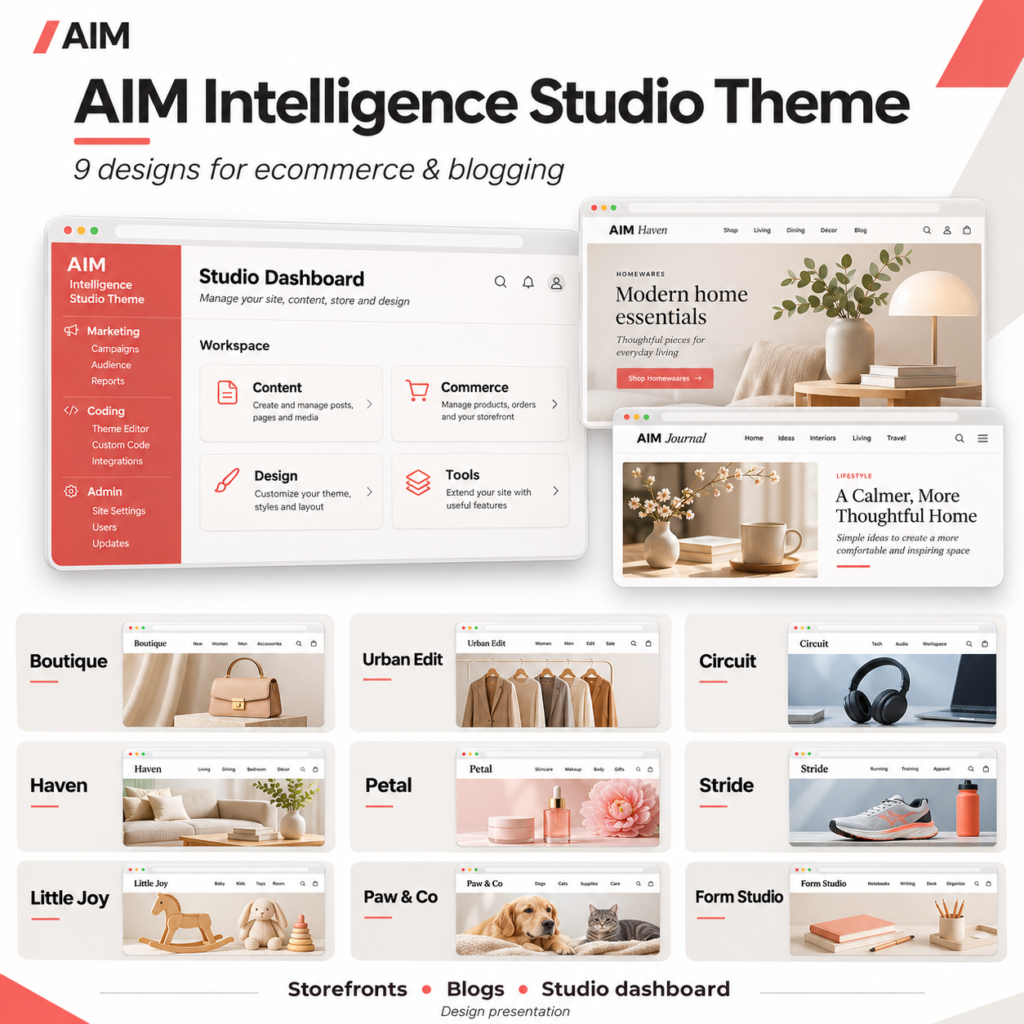
Before building a storefront with the AIM Intelligence Studio Theme Pack, separate the design layer from the services that run the shop. The theme supplies storefront presentation and a dashboard workspace. Product-related tools, cart functionality and payments depend on separately installed and configured plugins.
The most useful first action is to check those dependencies before uploading a theme. A product card or checkout layout is not evidence that a store can accept and process an order.
Understand what each component supplies
The theme pack: presentation and workspace
The collection includes nine individually installable themes. Each provides a dedicated store homepage, responsive product cards, and product detail and gallery presentation for compatible AIM shop listings. You can configure your own store name, logo, colours and contact information.
Each theme also includes native WordPress journal layouts and the embedded AIM Intelligence Studio Theme dashboard. Only one theme can be active on a site at a time.
AIM Engine: the separate core platform
The release instructs users to download, install and activate AIM Engine first, then complete their account and connection setup for the AIM AI developer community. Installing a theme alone does not connect an account or enable AI generation. AI features require connected provider access.
Shop plugins: separately configured operations
The themes are compatible with the separate AIM Dropship Importer and Image Studio. A separate checkout plugin supplies the multi-product cart and embedded Stripe Checkout, while delivery presentation comes from the configured checkout plugin.
AIM Engine, the importer/image studio and checkout/cart plugins are not included in the theme pack. Stripe payments require your own configured credentials and webhook. The release does not establish that these services are configured on any particular website.
Follow the installation sequence
- Check the environment: The stated requirements are WordPress 6.6 or later and PHP 7.4 or later.
- Install AIM Engine first: Activate it and complete your own account and connection setup.
- Extract the collection: Choose a design and locate its inner installable theme ZIP.
- Upload the theme: In WordPress, use Appearance, Themes, Add New and Upload Theme, then activate the chosen design.
- Apply your identity: Configure your store name, logo, colours, navigation and contact details.
- Configure shop dependencies: Install and configure the separate importer/image studio and checkout plugins for the ecommerce functions you intend to use.
- Create compatible shop pages: Use Appearance, Store setup.
- Set up the journal: Create a Journal page and assign it as the Posts page in Settings, Reading, alongside a static Home page.
- Review on staging: Check the website and any payment flow before launch.
The outer collection ZIP is a download bundle, not a directly installable theme. Each named design folder contains a theme, an individual listing description, a user guide and a static storefront preview. The collection also includes a start-here installation guide.
Turn staging into a practical launch gate
The release explicitly recommends staging checks. A useful review should distinguish what is visible from what has actually been tested.
Review the public storefront
Check your own products, images, descriptions and navigation in the chosen theme. Review the homepage, product cards, product details and galleries at different browser sizes. Responsive presentation is included in the release description, but live browser visual testing remains unverified.
Inspect contact information and delivery presentation for accuracy. Because delivery presentation is supplied by the configured checkout plugin, do not assume it is complete merely because the theme is active.
Review cart and payment behaviour
Where ecommerce is configured, test the multi-product cart and the embedded Stripe Checkout flow on staging before accepting real orders. Confirm that the required credentials and webhook have been configured, and assess the flow against the guidance for your separate checkout setup.
A theme activation or attractive checkout screen is not a substitute for payment integration testing. The supplied release facts do not verify a live transaction.
Hypothetical example: a small outdoor shop
An outdoor retailer could select Stride for its energetic palette and strong typography, then apply its branding and configure compatible product listings. Before launch, the team could review a multi-product basket, delivery presentation and the configured payment flow on staging.
If those checks identify missing delivery information or incomplete payment configuration, the appropriate next action is to resolve the underlying plugin setup. Switching the visual theme would not, by itself, establish that those operational gaps were fixed.
What the release evidence does—and does not—show
Version 1.4.0 reports completed static PHP parsing, JavaScript syntax and archive integrity checks. Live WordPress activation, browser visual testing and live payment integration remain unverified. Static previews and listing artwork are not working shops, and no demo products or articles are installed automatically.
The pack offers a coordinated starting point for storefront design, publishing and administration. Its suitability for your live shop depends on your environment, content, compatible plugins and completed testing. Finish with an editorial review of public copy and a documented staging decision before launch.
AIM Tools promotional article. Explore AIM Intelligence Studio Theme Pack — 9 Ecommerce & Blogging Designs and membership access.
Add an example, conclusion or question.
Short, specific responses help AIM Community improve future articles and product decisions.