
 AIM EngineCREATE · AUTOMATE · AMPLIFY
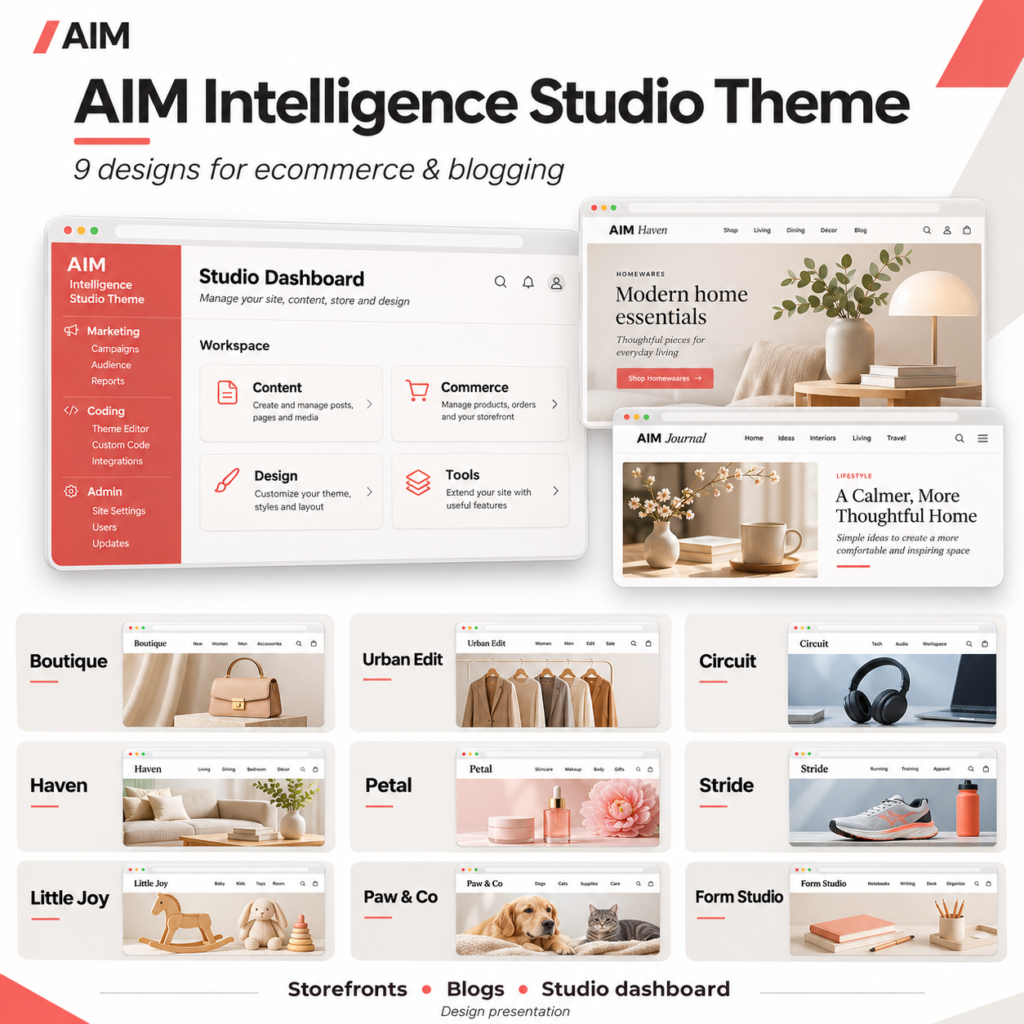
A shop journal is most useful when it answers questions that product listings cannot cover comfortably. Buying considerations, product context and practical explanations can give readers more information before they decide what to explore next. The AIM Intelligence Studio Theme Pack supports this approach by pairing storefront designs with native WordPress publishing layouts.
Start with one reader question and a complete publishing route, rather than a large content calendar. Create the Journal page, confirm how readers will find it, and prepare one carefully reviewed article. The theme provides the presentation structure; your team remains responsible for the accuracy and usefulness of the content.
What the pack provides for publishing
All nine themes include a journal index with excerpts, featured images and pagination. Individual articles can display dates, authors, categories and tags. The pack also provides category and date archives, search results, and navigation between posts.
Additional blogging support includes feed links, responsive embeds, block styling and WordPress comments when enabled. A separate Journal page can sit alongside the storefront homepage, allowing a business to maintain distinct shopping and reading destinations within the same visual design.
These are publishing and presentation capabilities, not a promise of traffic or sales. The release supplies no audience research, search performance data or campaign results.
Set up the publishing structure first
Complete the required foundation
The release requires AIM Engine to be downloaded, installed and activated first, followed by your own account and connection setup. The core platform is separate from the theme pack. Installing a theme alone does not connect an account or enable AI generation, and AI features require connected provider access.
Confirm WordPress 6.6 or later and PHP 7.4 or later. Extract the theme collection, select one design and upload its inner theme ZIP through the WordPress theme uploader. The outer bundle is not directly installable.
Separate the homepage from the journal
Create a Journal page and assign it as the Posts page in Settings, Reading, with a static Home page. Configure navigation so visitors can understand where to browse products and where to read articles.
Blogging uses native WordPress posts. Ecommerce functions have separate dependencies, so a journal layout should not be mistaken for evidence that product importing, cart operations or payments are ready.
Build an editorial workflow around real questions
Choose a focused subject
For a first article, select a question your business can answer using verified information. Keep its scope narrow enough to provide a complete answer. If you lack evidence for a product claim, obtain it or leave the claim out.
This is an editorial recommendation, not an automated feature of the pack. No demo articles are installed automatically, and the supplied facts do not establish an automatic content-generation or publishing workflow.
Prepare the article and its supporting details
Write a descriptive title, a useful introduction and clearly structured sections. Prepare a featured image and excerpt that accurately represent the article. Assign relevant categories and tags, then check the displayed author and date before publication.
Review how the article appears in its full layout, journal listing, relevant archives and search results. These different views can reveal an unclear excerpt, an unsuitable image or confusing category choices before readers encounter them.
Decide how comments will be handled
WordPress comments are available when enabled. Decide whether your team has the capacity to review and respond to comments before turning them on. The release does not describe a separate moderation service or automated response capability.
Use the Studio dashboard as an organised workspace
The embedded AIM Intelligence Studio Theme dashboard uses a light workspace design, coral accents and responsive cards. Its navigation groups Marketing, Coding and Admin, with activity workspaces for content, commerce, design, tools and other registered sections.
The dashboard can discover registered WordPress and installed plugin screens. This may help staff find relevant administration areas, but discovery is not proof that an external service is connected, authorised or supplying data.
Supported staff and app-access management remains subject to existing permissions. The workspace also displays the active theme name. A temporary native WordPress administration view is available, and a setting can disable dashboard replacement. If a separate Studio module is active, it takes precedence over the theme’s embedded module to avoid duplicate dashboards.
Hypothetical example: an interiors business
An interiors business could choose Haven for its warm natural colours and editorial presentation. Its first journal article might explain how to compare materials for a particular use, drawing only on information the business can verify.
The editor could prepare the article, excerpt, featured image and categories, then review the journal index and full article on staging. A colleague could check product-related statements and navigation before publication. This workflow could support a more consistent reading experience if the team completes those checks; it does not establish a ranking or conversion improvement.
Set a realistic review standard
Version 1.4.0 reports completed static PHP parsing, JavaScript syntax and archive integrity checks, while live WordPress activation, browser visual testing and live payment integration remain unverified. Treat the first article and journal setup as a staging exercise before using them publicly.
The next useful milestone is one complete, editorially reviewed article that readers can find through clear navigation and sensible archives. Once that workflow works for your team, use it as the basis for further publishing rather than expanding volume before the foundations are checked.
AIM Tools promotional article. Explore AIM Intelligence Studio Theme Pack — 9 Ecommerce & Blogging Designs and membership access.
Add an example, conclusion or question.
Short, specific responses help AIM Community improve future articles and product decisions.