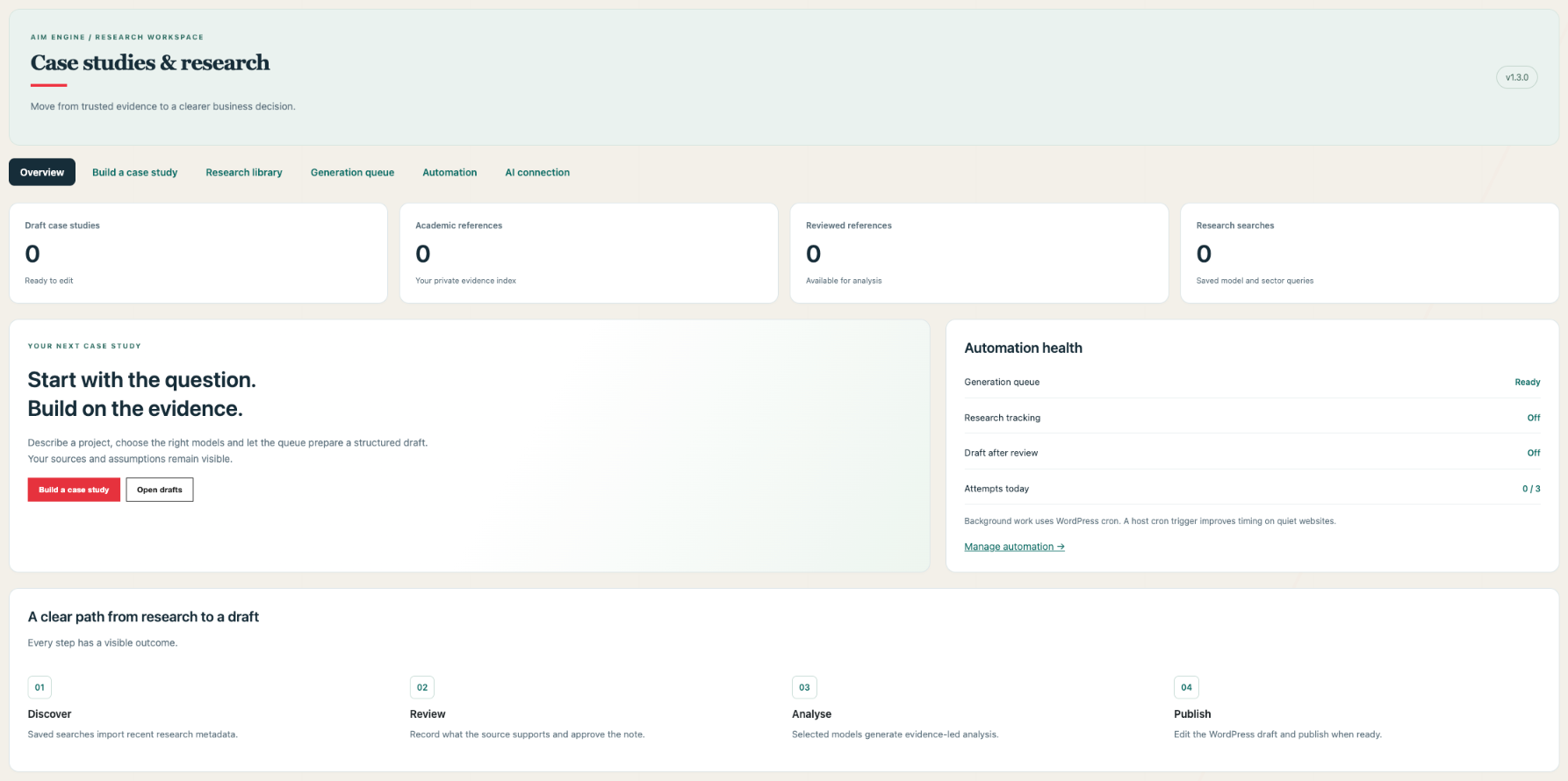
Queue AI-written WordPress case studies using 15 analysis models, reusable briefs and optional generation after evidence review. Organise academic references by model, category and label, track recent research through Crossref and OpenAlex, and connect reviewed evidence to your next analysis.
Turn your evidence into structured case studies and keep your research organised.
See the tool
Short description
Queue AI-written WordPress case studies using 15 analysis models, reusable briefs and optional generation after evidence review. Organise academic references by model, category and label, track recent research through Crossref and OpenAlex, and connect reviewed evidence to your next analysis.
Full description
AIM Case Study & Research Library helps consultants, agencies, entrepreneurs, educators and research teams turn a project brief and supporting sources into a structured business case study.
Use it on your own WordPress website with your own projects, source material, audience and call to action. It works independently of AIM Engine's other plugins and does not require participation in a particular directory, community or property project.
Choose one model for a focused report or combine several to examine the project from different angles. Generate SWOT, PESTEL, Porter's Five Forces, CSR and SCAMPER alongside stakeholder analysis, business modelling, feasibility, scenarios and other strategy frameworks. Each selected model includes evidence, assumptions and information gaps, followed by a combined conclusion and proposed 90-day plan.
Build a private academic reference index using Crossref and OpenAlex. Save model-specific or sector-specific searches, assign research categories and labels, and check for recent publications manually or through the optional scheduled tracker. Bibliographic records retain available authors, publication dates, journal or venue details, DOI links and provider information.
Review a paper and record the finding it actually supports before attaching its evidence note to an AI-generated case study. A background queue processes analyses and saves editable WordPress drafts. Monitor progress, retry failed jobs and pause generation from the redesigned workspace. Optionally generate a research-led draft when an administrator approves an evidence note using your saved application brief. Your team controls final wording, references and publication.
Key features
Navigate a redesigned dashboard with overview metrics and separate workspace tabs.
Save reusable briefs and restore your last project inputs.
Apply one-click strategy, investment, community-impact and business-development presets.
Automatically attach up to five reviewed references matching selected model labels.
Process analyses in a background queue with progress states and draft links.
Reuse matching jobs to reduce duplicate submissions.
Retry temporary generation failures with a three-attempt limit.
Pause generation and set a daily attempt limit.
Optionally queue an analysis when a reviewed evidence note is saved.
Generate analysis using any selection of 15 business models.
Create a focused model report or a combined case-study draft.
Separate supplied evidence, analytical assumptions and missing information.
Include a conclusion, limitations, proposed action plan and your call to action.
Record source links and dated references.
Maintain a private academic reference index on your website.
Connect to Crossref and OpenAlex research APIs.
Add default research searches for all 15 models or create sector-specific searches.
Organise references by analysis model, research category and labels.
Track recent publication matches manually or through optional WordPress scheduling.
Merge references with matching DOI identifiers across providers.
Attach reviewed academic evidence notes to case-study briefs.
Calculate illustrative operating scenarios from figures you enter.
Edit, preview and publish case studies using the WordPress editor.
Extend the workflow through developer hooks for AI providers and draft hand-offs.
- Navigate a redesigned dashboard with overview metrics and separate workspace tabs.
- Save reusable briefs and restore your last project inputs.
- Apply one-click strategy, investment, community-impact and business-development presets.
- Automatically attach up to five reviewed references matching selected model labels.
- Process analyses in a background queue with progress states and draft links.
- Reuse matching jobs to reduce duplicate submissions.
- Retry temporary generation failures with a three-attempt limit.
- Pause generation and set a daily attempt limit.
- Optionally queue an analysis when a reviewed evidence note is saved.
- Generate analysis using any selection of 15 business models.
- Create a focused model report or a combined case-study draft.
- Separate supplied evidence, analytical assumptions and missing information.
- Include a conclusion, limitations, proposed action plan and your call to action.
- Record source links and dated references.
- Maintain a private academic reference index on your website.
- Connect to Crossref and OpenAlex research APIs.
- Add default research searches for all 15 models or create sector-specific searches.
- Organise references by analysis model, research category and labels.
- Track recent publication matches manually or through optional WordPress scheduling.
- Merge references with matching DOI identifiers across providers.
- Attach reviewed academic evidence notes to case-study briefs.
- Calculate illustrative operating scenarios from figures you enter.
- Edit, preview and publish case studies using the WordPress editor.
- Extend the workflow through developer hooks for AI providers and draft hand-offs.
How to use
Install the ZIP through WordPress > Plugins > Add New > Upload Plugin, then activate it.
Open AIM Case Studies and configure your own OpenAI API key and accessible model, or arrange a developer-provided AI adapter.
Enter your project brief, audience, supporting source notes, uncertainties and call to action.
Select the analysis models you want to generate.
Optionally open Academic library & tracker, save research searches and import reference metadata.
Review relevant papers, add supported evidence notes and mark them reviewed.
Select reviewed references on the generation form. Add numerical scenario inputs if relevant.
Queue the analysis and follow its progress in Generation queue.
Optionally configure Automation with your reusable application brief, models and daily attempt limit; enable drafts after evidence review.
Review the generated draft and its references, then edit, preview and publish.
1. Install the ZIP through WordPress > Plugins > Add New > Upload Plugin, then activate it.
2. Open AIM Case Studies and configure your own OpenAI API key and accessible model, or arrange a developer-provided AI adapter.
3. Enter your project brief, audience, supporting source notes, uncertainties and call to action.
4. Select the analysis models you want to generate.
5. Optionally open Academic library & tracker, save research searches and import reference metadata.
6. Review relevant papers, add supported evidence notes and mark them reviewed.
7. Select reviewed references on the generation form. Add numerical scenario inputs if relevant.
8. Queue the analysis and follow its progress in Generation queue.
9. Optionally configure Automation with your reusable application brief, models and daily attempt limit; enable drafts after evidence review.
10. Review the generated draft and its references, then edit, preview and publish.
Technical details
Platform
WordPress
Version
1.3.0
Delivery
Downloadable plugin ZIP
Minimum WordPress
6.2+
Minimum PHP
7.4+
Analysis models
15, individually selectable
Generation access
Website administrators
AI output
Editable case-study drafts
Generation queue
Private jobs, duplicate checks, progress, retries and pause controls
Generation schedule
Five-minute WordPress cron worker; actual timing depends on site traffic and hosting
Default daily generation limit
Three processing attempts; configurable 1-20, resets midnight UTC
Reviewed-evidence automation
Optional; disabled by default
Saved briefs
Restored per administrator
Academic records
Private reference index
Reference organisation
Analysis models, research categories and labels
Default research window
Last 90 publication days; configurable per saved search
Research retrieval limit
Up to 25 newest matches per provider per search run
Saved research searches
Up to 30
Scheduling
Optional hourly WordPress cron processes one due search; each search becomes due after 24 hours
Duplicate matching
DOI; title and year fallback when DOI is unavailable
Source limit per case study
25 combined manual and academic sources
Academic selection per generation
Up to 15 reviewed references
Scenario calculation
Monthly revenue and operating result from entered units, price, variable cost and fixed costs
Other AIM plugins
Not required
WooCommerce
Not required
Scope and requirements
AI generation requires a working provider connection and may incur separate API charges. A ChatGPT subscription does not configure the plugin's API connection. Research access and limits depend on each external service.
The tracker discovers publication metadata; it does not provide exhaustive research coverage, download paywalled papers or automatically verify findings. Papers remain unreviewed until an administrator records and approves an evidence note. AI-generated claims and references require editorial review.
Scheduled research checks depend on WordPress cron and site traffic. Generation has a separate background queue. Optional evidence-review automation queues drafts using your saved profile. API charges may apply; daily attempt limits are not monetary budgets. Running jobs may finish after pausing. Publishing remains manual.
Numerical scenarios use supplied figures and explicit operating formulas. They do not provide a valuation, complete investment appraisal or guaranteed forecast. Missing numerical inputs are not estimated by the calculator.
The standalone workflow supports unrelated website owners without requiring an AIM Engine customer account. Membership billing, licence enforcement and customer access entitlements are not built into this version. Developer hooks are connection points, not confirmation of completed integrations with other tools.
PRODUCT BENCHMARK
Compare tools & membership value
Our comparison research is being prepared. Alternatives and pricing will appear here when research completes.
INTERACTIVE PREVIEW
Explore the workflow
A guided presentation built from this listing. This preview does not run the plugin or change your website.
Understand the tool
Queue AI-written WordPress case studies using 15 analysis models, reusable briefs and optional generation after evidence review. Organise academic references by model, category and label, track recent research through Crossref and OpenAlex, and connect…
[{"title":"Understand the tool","text":"Queue AI-written WordPress case studies using 15 analysis models, reusable briefs and optional generation after evidence review. Organise academic references by model, category and label, track recent research through Crossref and OpenAlex, and connect\u2026"},{"title":"Preview the interface","text":"Browse the gallery above to inspect the supplied product screenshots."},{"title":"Start with your membership","text":"Choose an eligible membership, download the ZIP from My AIM, and install it in WordPress. Follow the requirements stated in this listing."}]
From listing to your website
Choose an eligible membership.
Download the tool ZIP from My AIM.
In WordPress, open Plugins → Add New → Upload Plugin. For a theme, use Appearance → Themes → Add New.
Activate the tool and follow its settings and listed requirements.
AFTER YOU JOIN · THREE OPPORTUNITIES TO BUILD TOWARDS
Build an editorial asset customers keep using
Explore the process, the potential return and the evidence needed before scaling.
Make the process repeatable without losing editorial judgement. The opportunity is a growing asset: useful explanations that continue to help customers after the initial task is finished.
Choose the point where the audience needs enough information to act. Improve that explanation and give readers a relevant next step, then evaluate whether the enquiries or completed actions are useful to the business.
The strongest ambition is a process that can support a larger audience or more projects while retaining quality and sustainable costs. Expand a validated workflow, keep owners accountable and review the economics as volume grows.
Compare relevant specialist alternatives and adjacent workflows. These are different products: a shared task does not mean identical features, data or service scope.
Prices, deployment, capabilities and practical limits
Official sources reviewed 7 October 2026. GBP and USD remain in their published currencies; taxes, promotions and renewal prices may differ. Monthly equivalents of annual plans are labelled. Free editions have limits; quote-based or dynamic pricing is linked rather than estimated. AIM does not claim access to competitors’ private datasets or guarantee their feature parity.
USEFUL ANSWERS
AIM Case Study & Research Library: frequently asked questions
Where do I find the tools relevant to AIM Case Study & Research Library?
The Tools directory groups plugins, add-ons, modules and themes by category. Each card identifies its release status and required membership level.
How do I put AIM Case Study & Research Library into practice?
Use this page to define one decision, collect the relevant facts and choose a next step that your team can evaluate.
What results should I expect from this workflow?
Results depend on the business, demand, competition and execution. Set a measurable objective and review actual enquiries, costs and published work; the membership does not guarantee rankings or revenue.
Your region.
Change the country and payment currency used for your visit.
Your country is suggested using your IP address. Change your region at any time; precise GPS location is not used.