Automatically connect related WordPress content, audit internal link health and repair matched broken or missing links. Review source pages, destinations and repair results from one standalone dashboard, without an AI API key.
Automatically connect related WordPress content, audit internal link health and repair matched broken or missing links. Review source pages, destinations and repair results from one standalone dashboard, without an AI API key.
Full description
Build a better-connected website with AIM Internal Links. The plugin scans your published WordPress content, extracts relevant linking phrases and adds contextual links to suitable pages automatically.
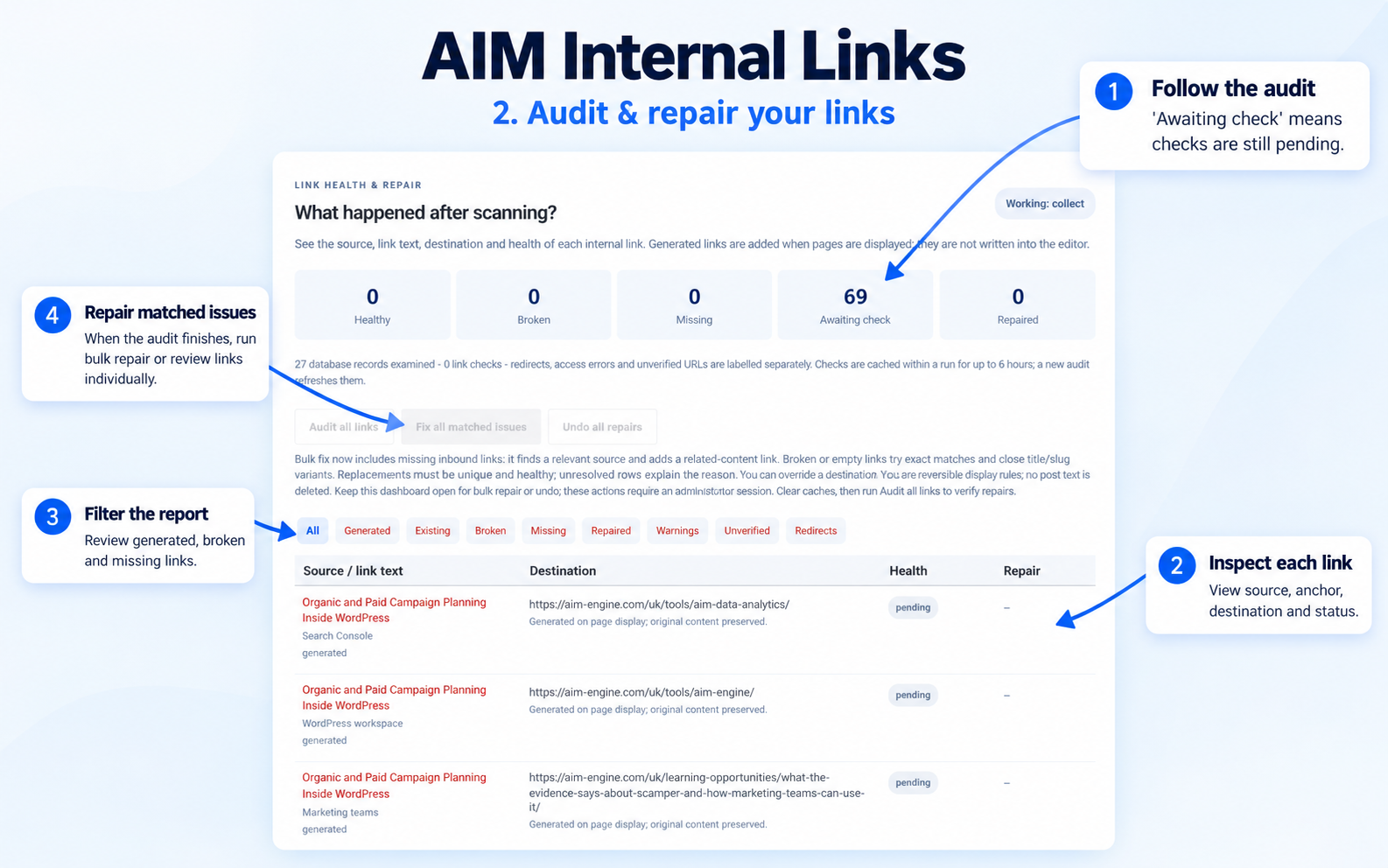
Its dedicated dashboard brings content discovery, link health checks and repair controls together. See which links are generated, where existing links lead, which destinations return errors and which pages lack an inbound link in the audited content.
When a link breaks, the repair tool checks old slugs, current slugs, exact anchor titles and close title or version variants. It applies a repair only when it finds an eligible, healthy destination. For missing inbound links, it can find a related source page and add a related-content link pointing to the unlinked page.
Original post text stays intact. Generated links and repairs are applied when content is displayed, and repair rules can be undone. Ambiguous matches remain visible with an explanation and manual controls.
Key features
Automatic content scanning: analyse published posts, pages, products and public custom content types on the current WordPress installation.
Content-based linking: extract phrases from titles, headings, descriptions, categories and repeated body text without requiring manual keyword entry.
Link health report: view source pages, anchor text, destinations, link types and status beneath the scanner.
Clear status categories: distinguish healthy links, confirmed 404/410 failures, redirects, warnings and unverified destinations.
Missing inbound detection: identify pages with no incoming link in the audited saved-content graph.
Bulk repair: use Fix all matched issues to process suitable broken, empty and missing-inbound cases.
Replacement variants: look beyond exact titles to sufficiently similar title, slug and version alternatives.
Relevant source selection: find a related page for a missing inbound link and verify both source and target URLs.
Individual controls: use Find variant & fix, Find source & fix, or select destination and source IDs manually.
Diagnostic reasons: understand why an issue remains unresolved instead of seeing an unexplained missing warning.
Reversible changes: undo URL repair and related-content rules without deleting original post text.
Linking controls: set a limit of 1-10 new contextual links per page; the default is 3.
Link protection: avoid self-links and duplicate generated destinations; preserve existing anchors, headings, code and form content during contextual insertion.
Exclusions: exclude selected content and respect known Yoast/Rank Math noindex metadata for generated targets.
Ongoing updates: reindex edited or published content and run a daily content sweep.
Standalone dashboard: access Internal Links from its own top-level WordPress admin menu.
- Automatic content scanning: analyse published posts, pages, products and public custom content types on the current WordPress installation.
- Content-based linking: extract phrases from titles, headings, descriptions, categories and repeated body text without requiring manual keyword entry.
- Link health report: view source pages, anchor text, destinations, link types and status beneath the scanner.
- Clear status categories: distinguish healthy links, confirmed 404/410 failures, redirects, warnings and unverified destinations.
- Missing inbound detection: identify pages with no incoming link in the audited saved-content graph.
- Bulk repair: use Fix all matched issues to process suitable broken, empty and missing-inbound cases.
- Replacement variants: look beyond exact titles to sufficiently similar title, slug and version alternatives.
- Relevant source selection: find a related page for a missing inbound link and verify both source and target URLs.
- Individual controls: use Find variant & fix, Find source & fix, or select destination and source IDs manually.
- Diagnostic reasons: understand why an issue remains unresolved instead of seeing an unexplained missing warning.
- Reversible changes: undo URL repair and related-content rules without deleting original post text.
- Linking controls: set a limit of 1-10 new contextual links per page; the default is 3.
- Link protection: avoid self-links and duplicate generated destinations; preserve existing anchors, headings, code and form content during contextual insertion.
- Exclusions: exclude selected content and respect known Yoast/Rank Math noindex metadata for generated targets.
- Ongoing updates: reindex edited or published content and run a daily content sweep.
- Standalone dashboard: access Internal Links from its own top-level WordPress admin menu.
How to use
Upload the ZIP through WordPress > Plugins > Add New > Upload Plugin and activate it.
Open Internal Links in the main WordPress admin menu.
Allow the automatic scan to run, or select Scan website now.
Review the link report beneath the scanner. Use Audit all links for a fresh report.
Select Fix all matched issues, or use the repair controls on an individual row.
Keep the dashboard open during bulk repair or undo. Clear page/CDN caches afterward and rerun the audit to check the results.
1. Upload the ZIP through WordPress > Plugins > Add New > Upload Plugin and activate it.
2. Open Internal Links in the main WordPress admin menu.
3. Allow the automatic scan to run, or select Scan website now.
4. Review the link report beneath the scanner. Use Audit all links for a fresh report.
5. Select Fix all matched issues, or use the repair controls on an individual row.
6. Keep the dashboard open during bulk repair or undo. Clear page/CDN caches afterward and rerun the audit to check the results.
Scope and requirements
- WordPress 6.2 or later.
- PHP 7.4 or later with DOM/php-xml enabled.
- Database permissions to create the plugin's index and audit tables.
- A WordPress administrator account for dashboard and bulk repair controls.
- WP-Cron/site visits or a server cron runner for background scans.
- Working same-site HTTP access for destination verification.
- Content displayed through the standard WordPress main-content filter.
PRODUCT BENCHMARK
Compare tools & membership value
Our comparison research is being prepared. Alternatives and pricing will appear here when research completes.
INTERACTIVE PREVIEW
Explore the workflow
A guided presentation built from this listing. This preview does not run the plugin or change your website.
Understand the tool
Automatically connect related WordPress content, audit internal link health and repair matched broken or missing links. Review source pages, destinations and repair results from one standalone dashboard, without an AI API key.
[{"title":"Understand the tool","text":"Automatically connect related WordPress content, audit internal link health and repair matched broken or missing links. Review source pages, destinations and repair results from one standalone dashboard, without an AI API key."},{"title":"Preview the interface","text":"Browse the gallery above to inspect the supplied product screenshots."},{"title":"Start with your membership","text":"Choose an eligible membership, download the ZIP from My AIM, and install it in WordPress. Follow the requirements stated in this listing."}]
From listing to your website
Choose an eligible membership.
Download the tool ZIP from My AIM.
In WordPress, open Plugins → Add New → Upload Plugin. For a theme, use Appearance → Themes → Add New.
Activate the tool and follow its settings and listed requirements.
AFTER YOU JOIN · THREE OPPORTUNITIES TO BUILD TOWARDS
Build an editorial asset customers keep using
Explore the process, the potential return and the evidence needed before scaling.
Make the process repeatable without losing editorial judgement. The opportunity is a growing asset: useful explanations that continue to help customers after the initial task is finished.
Choose the point where the audience needs enough information to act. Improve that explanation and give readers a relevant next step, then evaluate whether the enquiries or completed actions are useful to the business.
The strongest ambition is a process that can support a larger audience or more projects while retaining quality and sustainable costs. Expand a validated workflow, keep owners accountable and review the economics as volume grows.
Compare relevant specialist alternatives and adjacent workflows. These are different products: a shared task does not mean identical features, data or service scope.
Prices, deployment, capabilities and practical limits
Official sources reviewed 7 October 2026. GBP and USD remain in their published currencies; taxes, promotions and renewal prices may differ. Monthly equivalents of annual plans are labelled. Free editions have limits; quote-based or dynamic pricing is linked rather than estimated. AIM does not claim access to competitors’ private datasets or guarantee their feature parity.
Where do I find the tools relevant to AIM Internal Links – Auto Linking & Repair?
The Tools directory groups plugins, add-ons, modules and themes by category. Each card identifies its release status and required membership level.
How do I put AIM Internal Links – Auto Linking & Repair into practice?
Use this page to define one decision, collect the relevant facts and choose a next step that your team can evaluate.
What results should I expect from this workflow?
Results depend on the business, demand, competition and execution. Set a measurable objective and review actual enquiries, costs and published work; the membership does not guarantee rankings or revenue.
Your region.
Change the country and payment currency used for your visit.
Your country is suggested using your IP address. Change your region at any time; precise GPS location is not used.