
 AIM EngineCREATE · AUTOMATE · AMPLIFY
When a WordPress link appears broken, first establish what the audit actually found. A confirmed 404 or 410 failure needs different treatment from a redirect, a warning or an unverified destination. AIM Internal Links – Auto Linking & Repair v1.4.1 separates these categories and provides repair controls for eligible matches, rather than treating every non-healthy status as the same problem.
Its strongest practical use is a supervised repair workflow: audit the content, inspect the available replacement evidence, apply suitable rules and verify the displayed result. Repairs are applied when content is displayed, original post text remains intact and URL repair rules can be undone.
Read the evidence before choosing a repair
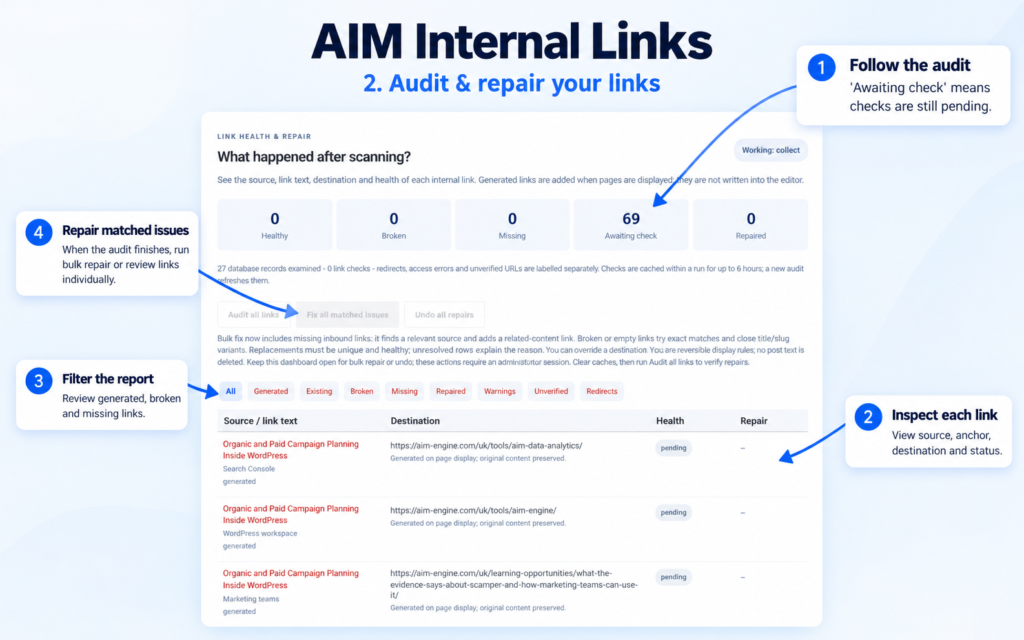
The standalone Internal Links dashboard shows source pages, anchor text, destinations, link types and statuses beneath the scanner. Use Audit all links when you need a fresh report.
- Healthy links: distinguish these from issues that need attention.
- Confirmed 404/410 failures: review these as destinations returning those failure responses.
- Redirects: assess separately rather than equating them with confirmed failures.
- Warnings and unverified destinations: investigate the reported condition before deciding that a replacement is needed.
Destination verification depends on working same-site HTTP access. An unverified destination is therefore not, by itself, proof that the underlying page is missing.
How AIM Internal Links looks for a replacement
The repair tool checks old slugs, current slugs, exact anchor titles and close title or version variants. It applies a repair only when it finds an eligible, healthy destination.
This matters when content has moved or a related version exists, but matching is still constrained by the available evidence. A similarly named page may be technically eligible without being the best answer for a reader. Review topic, purpose and version relevance before accepting a destination as an editorial replacement.
Ambiguous matches remain visible with an explanation and manual controls. An unresolved row is not necessarily a failure of the workflow: it can indicate that the software does not have a sufficiently clear eligible match to apply automatically.
A step-by-step repair session
1. Establish the current report
Open Internal Links in the WordPress admin menu. Allow the content scan to run, or use Scan website now, then select Audit all links for a fresh link report. Review the source and anchor alongside the destination so you understand what the reader expected to reach.
2. Choose bulk or individual action
Fix all matched issues processes suitable broken, empty and missing-inbound cases. It is not a promise that every reported issue will be resolved. If your immediate task is limited to particular broken URLs, individual row controls offer a more focused review path.
Use Find variant & fix for an individual replacement search, or select a destination ID manually where appropriate. The dashboard also provides source selection controls for missing-inbound work, which is a different task from replacing an existing broken URL.
3. Read unresolved explanations
Where no repair is applied, use the diagnostic reason to guide the next decision. Do not force an unrelated destination simply to remove a warning. If the report does not establish an appropriate match, leave the case for an editorial decision rather than treating link removal or redirection as automatically justified.
4. Complete the verification loop
Keep the dashboard open during bulk repair or undo. Afterward, clear page/CDN caches and rerun the audit to check results. Because rules affect displayed content rather than rewriting original post text, also inspect the relevant displayed page to confirm that the link behaves as intended.
Hypothetical example: a renamed documentation page
Hypothetical example: An older article links to a setup page whose URL now returns a confirmed 404. A current setup page exists under a different slug. The repair tool checks its supported matching evidence and may identify that page as an eligible, healthy destination.
If the current page still addresses the instructions promised by the source anchor, the administrator can accept the matched repair, clear caches and audit again. If it covers a substantially different version, the title similarity alone should not settle the decision. The appropriate next step is editorial review, using the manual destination control only when a suitable replacement has been established.
Know what reversible repair does—and does not—prove
Undo controls provide a way to reverse URL repair rules without deleting original post text. They support cautious maintenance, but do not guarantee that every replacement preserves the original meaning.
The release requires administrator access, supported WordPress and PHP versions, database table permissions and the standard WordPress main-content filter for display-time behavior. Its supplied facts contain no repair success rate or measured business results. Promote the workflow on what is supported: visible evidence, eligible destination checks, manual handling of ambiguity and reversible rules. All affected copy and destination choices require editorial review.
AIM Tools promotional article. Explore AIM Internal Links – Auto Linking & Repair and membership access.
Add an example, conclusion or question.
Short, specific responses help AIM Community improve future articles and product decisions.