
 AIM EngineCREATE · AUTOMATE · AMPLIFY
A published page can exist without a useful route to it from related content. The first step is to establish whether it lacks incoming links in the content you have actually audited—not to assume it is unreachable everywhere. AIM Internal Links – Auto Linking & Repair v1.4.1 identifies pages with no incoming link in the audited saved-content graph and offers a way to add a related-content link from a relevant source page.
This is a focused maintenance task for WordPress administrators and content teams: find gaps in the audited content relationships, judge which pages deserve another route in, and verify the result. The plugin combines discovery and repair controls in one dashboard without requiring an AI API key.
What a missing-inbound finding means
The release describes missing-inbound detection within the audited saved-content graph. That scope matters. A finding tells you about incoming links in that audited content; it does not establish that no navigation, external reference or other route to the page exists.
Likewise, a missing-inbound finding is not proof that a page should receive a new link. Some pages may have little relevance to the rest of the content library. Others may need editorial revision before you direct more readers toward them. Use the report as a review queue rather than a requirement to connect every page indiscriminately.
How the plugin creates a route to an unlinked page
For a missing-inbound case, AIM Internal Links can find a related source page and add a related-content link pointing to the unlinked target. It verifies both source and target URLs. Administrators can use Find source & fix or select source and destination IDs manually.
This is distinct from inserting a contextual link into an existing phrase. The release specifically describes the missing-inbound repair as adding a related-content link. Keeping those mechanisms separate makes it easier to understand what changed and where to look during review.
Generated links and repairs are applied when content is displayed, leaving original post text intact. Related-content rules can be undone. Where the software cannot resolve a case, diagnostic explanations and manual controls keep the remaining decision visible.
A useful review process for content teams
1. Scan the published library
Open Internal Links in the top-level WordPress admin menu and allow the automatic scan to run, or select Scan website now. The plugin analyses published posts, pages, products and public custom content types on the current installation.
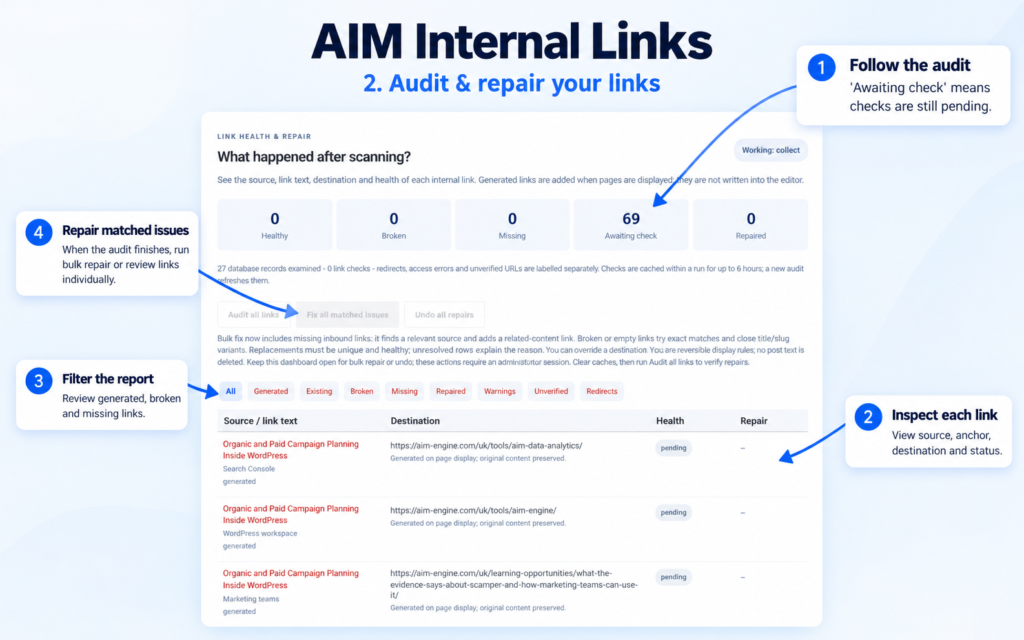
Use Audit all links for a fresh report. Review the missing-inbound findings alongside the source, destination and status information available in the dashboard.
2. Decide whether the target deserves a new connection
Read the target page before selecting a source. A useful editorial test is whether the page answers a genuine next question for someone reading related material. This is a recommendation for the review process, not an automatic relevance guarantee supplied by the software.
If the page is unsuitable for generated linking, use the available content exclusions. The plugin also respects known Yoast/Rank Math noindex metadata for generated targets. That safeguard should not be expanded into an assumption that all indexing settings or external services have been verified.
3. Review the proposed source relationship
Use Find source & fix for an individual case. Check whether the proposed source and target belong together in the reader’s journey. If selecting IDs manually, confirm that you have chosen the intended pages rather than relying on similar titles alone.
Fix all matched issues can process suitable missing-inbound cases alongside suitable broken and empty-link cases. For a narrowly scoped content review, individual controls can make each source-to-target decision easier to inspect.
4. Verify the displayed result
Keep the dashboard open during bulk repair or undo. Clear page/CDN caches afterward, rerun the audit and inspect the displayed source page. The important check is whether the intended link appears and reaches the intended destination.
Because missing-inbound detection is scoped to audited saved content while repairs operate at display time, do not assume that every saved-content finding must disappear solely because a display-time rule exists. Review the reported repair result and the displayed page together.
Hypothetical example: a useful guide with no audited incoming link
Hypothetical example: A site publishes a detailed maintenance guide, but the audit finds no incoming link to it in saved content. An established troubleshooting article covers a closely related problem.
The administrator reviews both pages, uses Find source & fix and checks whether the troubleshooting article is a suitable source. If an eligible relationship is established and both URLs verify, the related-content rule can give readers a route to the guide. After clearing caches, the administrator checks the displayed article and reruns the audit.
The possible outcome is better discovery of an existing resource, conditional on the relevance and placement of that connection. No traffic increase, ranking improvement or conversion gain is established by the supplied release facts.
Make inbound-link review an ongoing habit
AIM Internal Links reindexes edited or published content and runs a daily content sweep. Background operation requires WP-Cron/site visits or a server cron runner, and display-time behavior requires the standard WordPress main-content filter.
Use those updates to support a recurring editorial review, especially after publishing new resources or changing older material. The next action is practical: identify one worthwhile missing-inbound page, establish a genuinely related source and verify the connection before expanding the workflow. All copy and related-content choices require editorial review.
AIM Tools promotional article. Explore AIM Internal Links – Auto Linking & Repair and membership access.
Help shape the next version
Share a question, experience or useful evidence about this article. Responses are held privately for editorial review, not published as testimonials.
Add an example, conclusion or question.
Short, specific responses help AIM Community improve future articles and product decisions.