
 AIM EngineCREATE · AUTOMATE · AMPLIFY
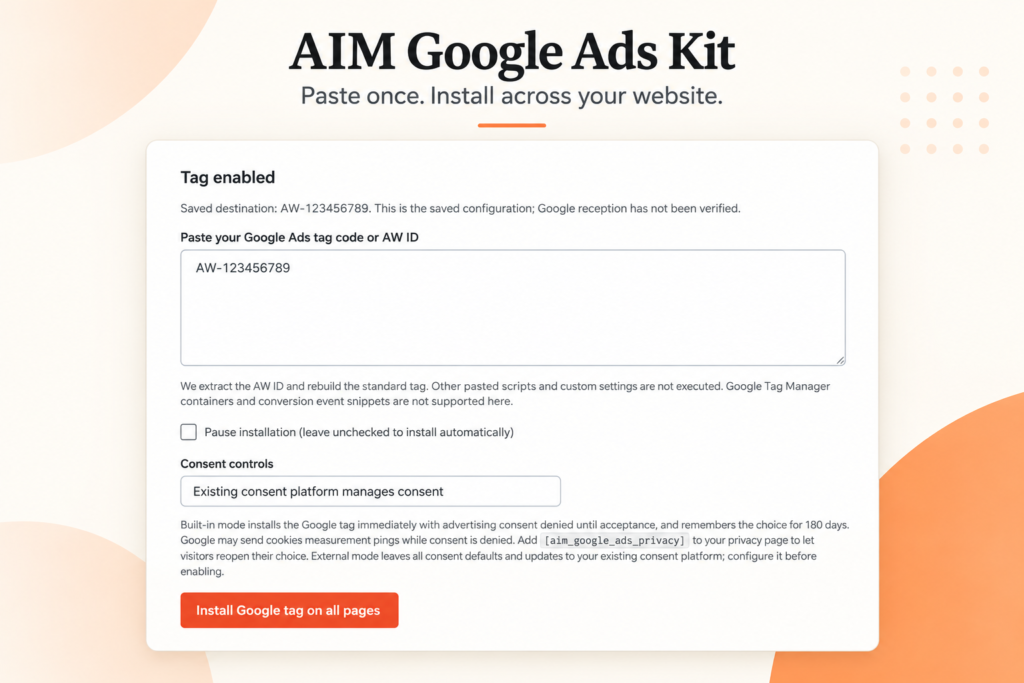
Before installing a Google Ads tag on WordPress, decide who will manage visitor consent and who can pause the tag. AIM Google Ads Kit – Tag Manager combines base-tag placement with a built-in consent banner offering Accept, Reject and privacy controls. It also supports an existing consent platform and lets administrators pause the tag from plugin settings.
Those features give teams practical controls to consider together. They do not, on their own, establish legal compliance or prove how every consent configuration behaves. A useful rollout plan separates the features described in the release from the checks needed on the actual website.
Choose the consent approach before launch
When considering the built-in banner
The built-in banner provides Accept, Reject and privacy controls. For a team assessing a new installation, that means the plugin includes a visitor-facing consent interface rather than offering tag placement alone.
Before relying on it, ask the person responsible for privacy requirements to review the intended setup. The supplied facts do not describe the precise behaviour of each control, the information displayed within privacy controls or region-specific configuration. Those details should be verified rather than inferred.
When a consent platform already exists
The release states that AIM Google Ads Kit supports an existing consent platform. That is relevant to websites that already have a consent process and want to assess the plugin without assuming that process must be replaced.
However, the supplied information does not name supported platforms or explain setup steps for individual services. Confirm compatibility with the website’s actual platform and review how the chosen arrangement behaves. Treat the stated support as a capability to investigate, not proof that every external consent service is configured automatically.
Review visitor choices as part of implementation
A practical review should cover the consent interface as well as tag placement. The following are recommended checks, not documented test results for this release:
- Confirm that the intended consent interface appears on relevant public pages.
- Review the wording and accessibility of the visitor choices with the appropriate website owner.
- Test Accept, Reject and privacy controls against the behaviour your team requires.
- Check how an existing consent platform and the plugin work together before relying on the arrangement.
- Record unresolved questions and assign someone to resolve them.
The distinction matters because an interface being available is not the same as a verified consent implementation. The release facts do not specify consent defaults, storage details or the exact sequence of tag activity around visitor choices.
Give the pause control an operational owner
AIM Google Ads Kit allows the tag to be paused from plugin settings. This offers a direct control when the team needs to stop the plugin’s tag operation while reviewing the implementation.
Decide who is authorised to use that setting and how a change will be communicated. If advertising staff expect measurement to continue while a website administrator has paused the tag, campaign interpretation may become confused. A simple change record can help the team connect website changes with later measurement questions.
Do not assume that pausing this plugin also pauses a separate copy installed elsewhere. The release explicitly says existing copies of the same tag should be disabled to avoid duplication. Reviewing other installations remains a separate responsibility.
Hypothetical example: retaining an existing consent process
A WordPress shop already uses a consent platform and is considering AIM Google Ads Kit for base-tag placement. The team could first confirm support for its particular consent setup, check for duplicate tags and test the intended visitor choices before relying on the installation.
If those checks succeed, the possible outcome is a base-tag workflow that fits the website’s existing consent approach. That outcome is conditional on compatibility and correct configuration; it is not established by the product description alone.
Make the next decision evidence-led
AIM Google Ads Kit is worth assessing when a team wants WordPress-wide base-tag placement alongside consent and pause controls. Start by documenting the current consent platform, identifying the person responsible for privacy review and agreeing on the required behaviour.
Then verify the implementation against that plan. Keep conversion measurement on a separate checklist: the plugin installs the base tag, while purchase and other conversion events require separate configuration.
AIM Tools promotional article. Explore AIM Google Ads Kit – Tag Manager and membership access.
Add an example, conclusion or question.
Short, specific responses help AIM Community improve future articles and product decisions.