
 AIM EngineCREATE · AUTOMATE · AMPLIFY
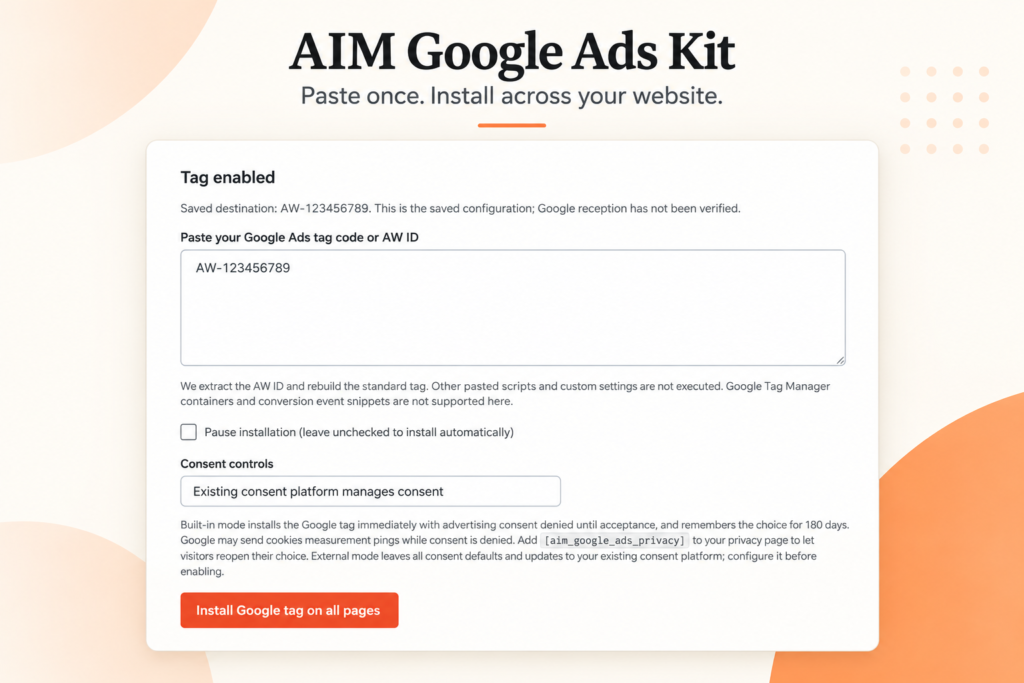
AIM Google Ads Kit – Tag Manager gives WordPress teams a direct way to install a Google Ads base tag without editing individual pages or theme files. Paste your Google tag code or AW tracking ID into the plugin, then click Install Google tag on all pages. The plugin handles placement in public WordPress page headers.
The important first step is not installation, however. It is checking whether the same tag is already present. The supplied release facts explicitly advise disabling existing copies to avoid duplication. For a marketing team taking over an established website, that check should come before adding another installation route.
Check the website before installing
Confirm the technical requirements
The plugin requires WordPress 6.0 or later and PHP 7.4 or later. Confirm those requirements with the person responsible for the website before proceeding. AIM Google Ads Kit works independently: it does not require the AIM Engine core plugin or a Google API key.
That independence makes it an option for teams whose immediate task is tag placement rather than adopting a wider software setup. It does not remove the need to check the website’s existing tracking arrangements.
Identify an existing copy of the tag
Ask the website administrator or advertising specialist whether the intended Google Ads tag is already installed. Review the current implementation before deciding which installation method will remain active. If an existing copy of the same tag is present, arrange to disable it as part of the change.
This is a recommendation for avoiding the duplication identified in the release facts, not a claim that the plugin automatically detects or removes other installations.
Follow the installation workflow
- Prepare the input: use your Google Ads base tag code or AW tracking ID. Both are accepted.
- Check the value: confirm that the code or ID is the one intended for this website.
- Submit the installation: paste it into AIM Google Ads Kit and click Install Google tag on all pages.
- Review the result: arrange an implementation check before relying on the tag for measurement.
The documented placement covers public WordPress pages, including pages, posts, archives, shop pages and checkout pages. This is useful when an advertising journey spans several types of content rather than a single landing page.
The release describes automatic placement, not proof that a particular website has completed a successful installation. Reviewing representative public pages after the change is therefore a sensible operational step.
Understand what installation does not complete
The plugin installs the Google Ads base tag. Purchase events and other conversion events require separate configuration. Having the base tag on a checkout page is not, by itself, evidence that purchases are being recorded as conversions.
Before launching or evaluating a campaign, list the outcomes the team needs to measure. Separate the base-tag installation task from the work needed to configure and validate those outcomes. This avoids treating a completed installation as a completed measurement plan.
Hypothetical example: one tag across a mixed-content website
A WordPress business has service pages, articles and a shop. Its team wants the Google Ads base tag placed across those public areas without editing each page. After checking for an existing copy, the team could enter its AW tracking ID in AIM Google Ads Kit and use the installation control.
If the team also wants purchase conversion measurement, it would need a separate configuration task. The possible benefit is a more straightforward base-tag placement workflow, provided the website meets the requirements and the implementation is checked. No advertising performance result follows automatically from that installation.
Keep ownership clear after installation
The plugin includes a setting to pause the tag. Assign responsibility for that control so a future troubleshooting change is understood by the advertising team. Also record which installation method is active, who owns conversion configuration and who will review consent settings.
For WordPress teams seeking a focused installation tool, AIM Google Ads Kit offers a clearly bounded workflow. The next action is to check the existing tag setup, confirm compatibility and prepare the correct code or ID—not to assume that installing a base tag finishes measurement.
AIM Tools promotional article. Explore AIM Google Ads Kit – Tag Manager and membership access.
Help shape the next version
Share a question, experience or useful evidence about this article. Responses are held privately for editorial review, not published as testimonials.
Add an example, conclusion or question.
Short, specific responses help AIM Community improve future articles and product decisions.