
 AIM EngineCREATE · AUTOMATE · AMPLIFY
If your goal is to measure purchases or enquiries from Google Ads, start by separating two tasks: placing the base tag and configuring the conversion events you need. AIM Google Ads Kit – Tag Manager handles the first task on WordPress. Its release scope explicitly states that purchase and other conversion events require separate configuration.
That boundary is useful when planning a campaign. It lets a team assess the plugin for a specific job without mistaking a site-wide installation for a finished measurement system.
What AIM Google Ads Kit installs
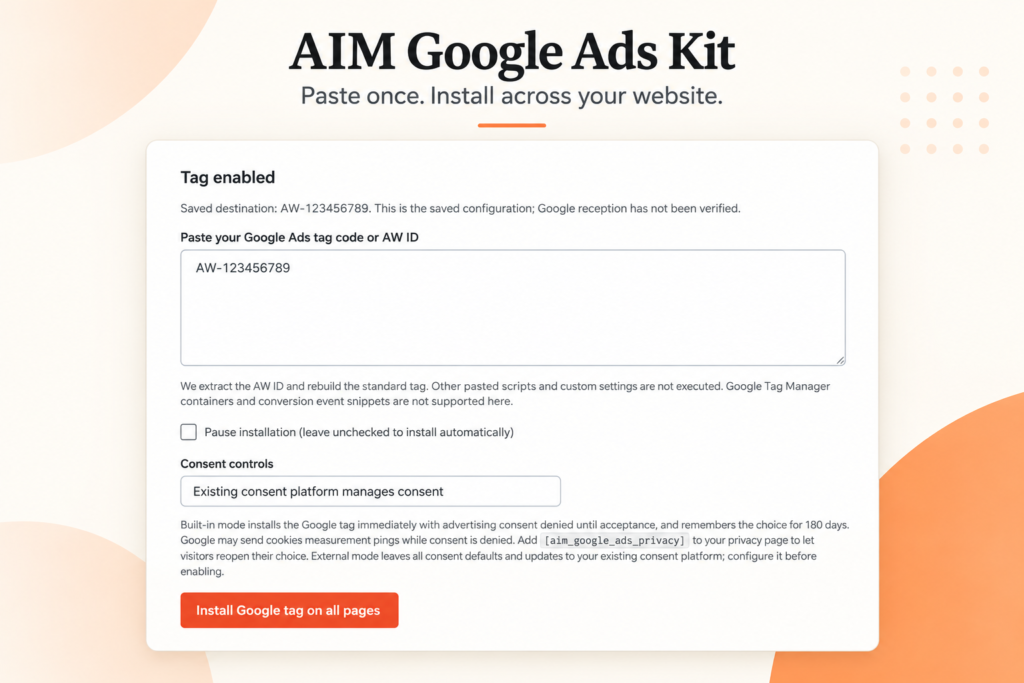
The plugin accepts Google Ads base tag code or an AW tracking ID. After the user clicks Install Google tag on all pages, it automatically adds the base tag to public WordPress page headers.
The stated coverage includes pages, posts, archives, shop pages and checkout pages. Teams can therefore use one installation workflow for the base tag rather than editing individual pages or theme files.
The requirements are WordPress 6.0 or later and PHP 7.4 or later. No AIM Engine core plugin or Google API key is required. These facts describe the installation requirements; they do not establish that conversion actions or reporting have been configured.
Why checkout coverage is not purchase measurement
A checkout page is part of the plugin’s stated placement coverage. A purchase conversion event is outside its stated installation scope. Keeping those facts separate prevents a common project handover error: marking measurement complete because the tag is present where a transaction takes place.
The same distinction applies to other desired outcomes. If a team wants to measure an enquiry or another action, it must plan the relevant conversion configuration separately. The supplied release information does not explain how to implement those events, so it should not be treated as an event-setup guide.
Build a measurement handover in four steps
1. Define the business actions first
Write down which visitor actions the advertising team needs to evaluate. Keep this list specific enough that the person responsible for conversion configuration understands the intended outcomes. This is a planning recommendation, not an additional plugin feature.
2. Assign base-tag installation separately
Give the website owner a bounded task: confirm compatibility, check for an existing copy of the same tag, enter the intended code or AW ID and review placement after installation. Existing copies should be disabled to avoid duplication, as stated in the release facts.
3. Assign conversion configuration and validation
Name the person responsible for the events on the measurement list. Ask them to confirm what has been configured and how it has been checked. Do not mark an event complete solely because AIM Google Ads Kit has installed the base tag.
4. Record consent and pause arrangements
The plugin includes a built-in consent banner with Accept, Reject and privacy controls, supports an existing consent platform and provides a pause setting. Include those controls in the handover so the people interpreting campaign information understand the website’s intended operating setup.
Hypothetical example: preparing a shop campaign
A WordPress shop wants to prepare for a Google Ads campaign. The website administrator uses AIM Google Ads Kit to place the base tag across public pages after checking for duplicate installation. A separate specialist is assigned to configure purchase conversion events.
The team should keep two completion states: base-tag installation reviewed, and purchase measurement configured and validated. If only the first is complete, the plugin may have fulfilled its documented role while the wider measurement project remains unfinished.
The possible operational benefit is a clearer division of work. Whether that leads to more useful campaign decisions depends on correct implementation, suitable event configuration and the evidence subsequently available. The release supplies no campaign results or guaranteed performance outcomes.
Evaluate the tool against the job you need done
AIM Google Ads Kit is a focused option when the immediate need is automatic base-tag placement across WordPress without page-by-page or theme-file editing. It should not be selected on the assumption that it also configures purchases or other conversion events.
The supplied facts contain no validated campaign results or event-configuration instructions. They also list different version values in the description and metadata, so confirm the available version before documenting a deployment.
Your next action is to create a short implementation checklist with separate owners for base-tag placement, consent review and conversion configuration. That turns the plugin’s narrow scope into a practical advantage: everyone can see what the software handles and what still needs to be done.
AIM Tools promotional article. Explore AIM Google Ads Kit – Tag Manager and membership access.
Add an example, conclusion or question.
Short, specific responses help AIM Community improve future articles and product decisions.