
 AIM EngineCREATE · AUTOMATE · AMPLIFY
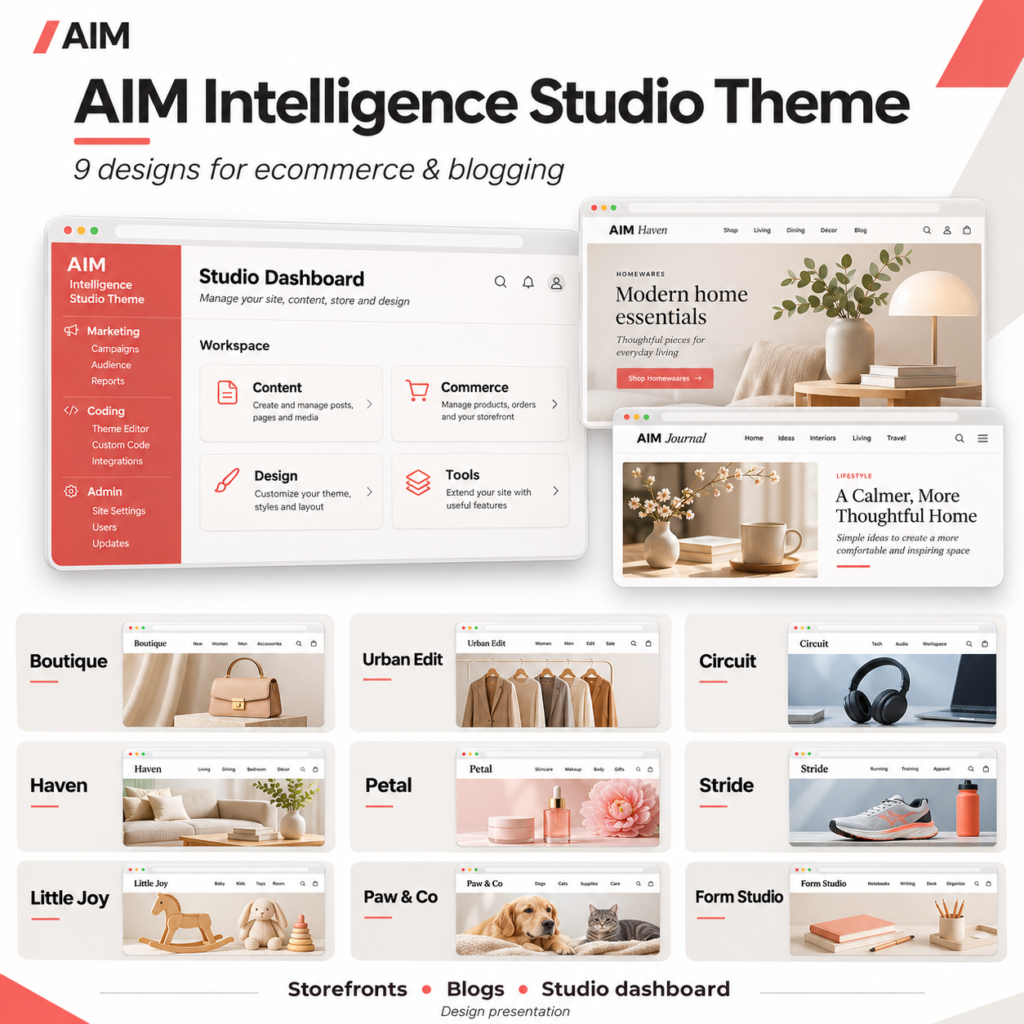
A business that sells products and publishes articles needs a design that serves both activities. A storefront should make products easy to explore, while a journal needs readable articles, useful archives and clear navigation. The AIM Intelligence Studio Theme Pack brings these requirements together in nine individually installable WordPress designs.
The practical starting point is to shortlist designs against your real products and planned articles, rather than choosing from promotional artwork alone. The supplied previews are static illustrations, not working shops, and the pack does not automatically install demo products or articles.
What stays consistent across the nine designs
Each theme combines ecommerce presentation templates with native WordPress blogging layouts and an embedded AIM Intelligence Studio Theme dashboard. The public-facing style changes between designs, but the collection shares a storefront-and-journal approach.
- A dedicated store homepage and responsive product cards.
- Product detail and gallery presentation for compatible AIM shop listings.
- A journal index with excerpts, featured images and pagination.
- Individual article layouts, category and date archives, and search results.
- An organised dashboard with grouped Marketing, Coding and Admin navigation.
This makes the pack worth considering when you want a choice of visual directions without sourcing separate design packs. It does not mean nine themes run together: only one theme can be active on a WordPress site at a time.
Match the visual direction to your content
Retail, fashion and technology
- Boutique: General retail and lifestyle, with warm cream and forest-green styling.
- Urban Edit: Fashion and accessories, using bold typography and sharp editorial treatments.
- Circuit: Technology and gadgets, with crisp blue styling for products and explainers.
For these options, compare your product photography with the stated visual direction. Then consider the articles you expect to publish. A shop built around technical explanations may have different presentation priorities from a fashion business publishing image-led seasonal edits.
Home, beauty and active living
- Haven: Home and interiors, with warm natural colours and an editorial presentation.
- Petal: Beauty and personal care, with soft colours and rounded forms.
- Stride: Sports and outdoors, with strong typography and an energetic palette.
Use the intended subject area as a starting point, not a requirement. Your own logo, colours, photography and writing still need to work with the chosen design. The theme provides presentation; it does not supply your brand identity or editorial position.
Family, pets and design-led products
- Little Joy: Toys and family, with playful colours and friendly shapes.
- Paw & Co: Pet accessories, with warm, welcoming product and article layouts.
- Form Studio: Gifts, stationery and design, with a minimal editorial style.
When comparing these styles, consider how comfortably each could present both your smallest product listing and your longest planned article. A category match is useful, but real content is the better basis for a final decision.
A practical selection workflow
Start with two candidate designs. Review their supplied storefront previews and individual user guides, then prepare representative content: a product image, a product description, an article with a featured image, and your store identity details.
Before installing a theme, follow the release’s required first step: download, install and activate the separate AIM Engine platform, then complete your account and connection setup. Confirm that your environment meets WordPress 6.6 or later and PHP 7.4 or later.
Extract the collection and upload the chosen inner theme ZIP, not the outer download bundle. Configure your name, logo, colours, navigation and contact details, then evaluate the result on staging. Existing Studio preferences are retained when switching between these theme variants, but you should still check the public pages after a switch.
Hypothetical example: a stationery shop with a journal
A stationery retailer could shortlist Form Studio for its minimal editorial style and Boutique for its broader retail presentation. The team could compare both using the same notebook listing and an article about choosing paper for different tasks.
If one design presents the retailer’s actual imagery and writing more clearly during staging review, that provides a practical reason to choose it. It would not establish that the design will increase sales or search visibility.
Know the limits before committing
The pack supplies website and dashboard designs. AIM Engine, the importer/image studio and checkout/cart plugins are separate downloads. AI generation requires connected provider access, and shop operations depend on separately configured plugins. The pack is designed for AIM shop plugins and is not advertised as a WooCommerce theme.
For version 1.4.0, static PHP parsing, JavaScript syntax and archive integrity checks are reported complete. Live WordPress activation, browser visual testing and live payment integration remain unverified. Your next step is therefore a staging evaluation with real content, followed by editorial review and any relevant checkout testing—not a launch based solely on preview artwork.
AIM Tools promotional article. Explore AIM Intelligence Studio Theme Pack — 9 Ecommerce & Blogging Designs and membership access.
Add an example, conclusion or question.
Short, specific responses help AIM Community improve future articles and product decisions.