
 AIM EngineCREATE · AUTOMATE · AMPLIFY
The safest place to automate a case-study workflow is the preparation of a reviewable draft, not the final decision to publish. A queue can organise generation, but it cannot decide whether a source is persuasive, an assumption is reasonable or a recommendation is ready for readers.
AIM Case Study & Research Library version 1.3.0 follows that distinction. It provides private generation jobs, reusable briefs, progress tracking and optional draft generation after evidence review. Publishing remains manual. For agencies and research teams working in WordPress, the practical opportunity is a more structured route from approved inputs to an editable draft.
Establish a working manual workflow first
Before enabling automation, install and activate the downloadable plugin ZIP, then configure a working AI provider connection. The documented setup uses your own OpenAI API key and an accessible model, or a developer-provided AI adapter. A ChatGPT subscription does not establish the plugin’s API connection.
The plugin requires WordPress 6.2 or later and PHP 7.4 or later. It works independently of other AIM plugins and does not require WooCommerce or an AIM Engine customer account. Generation access is for website administrators.
A sensible first test is one brief, a limited model selection and a small set of relevant sources. Review the resulting WordPress draft before saving a configuration for repeated use. This makes it easier to identify weaknesses in the brief before the same weaknesses are carried into more jobs.
Use saved briefs to standardise inputs, not conclusions
Reusable briefs and last project inputs restored per administrator can reduce repeated setup. The saved application brief also supplies the context used by optional evidence-review automation.
Standardise the elements that should remain stable, such as the intended audience and the purpose of the analysis. Recheck project-specific evidence, uncertainty and the call to action whenever the context changes. A reusable brief should support consistent preparation without forcing every project toward the same conclusion.
Hypothetical example: recurring research-led analysis
Suppose an agency regularly prepares research-led case studies for a defined audience. It could first test a saved brief manually, checking that the selected models produce a useful structure and that evidence notes are interpreted appropriately.
Only after that review might an administrator enable drafts after evidence review. When a reviewed evidence note is saved, the optional workflow can queue an analysis using the saved profile. This does not mean the paper has been independently verified by the software or that the resulting draft is ready to publish.
Understand the generation queue
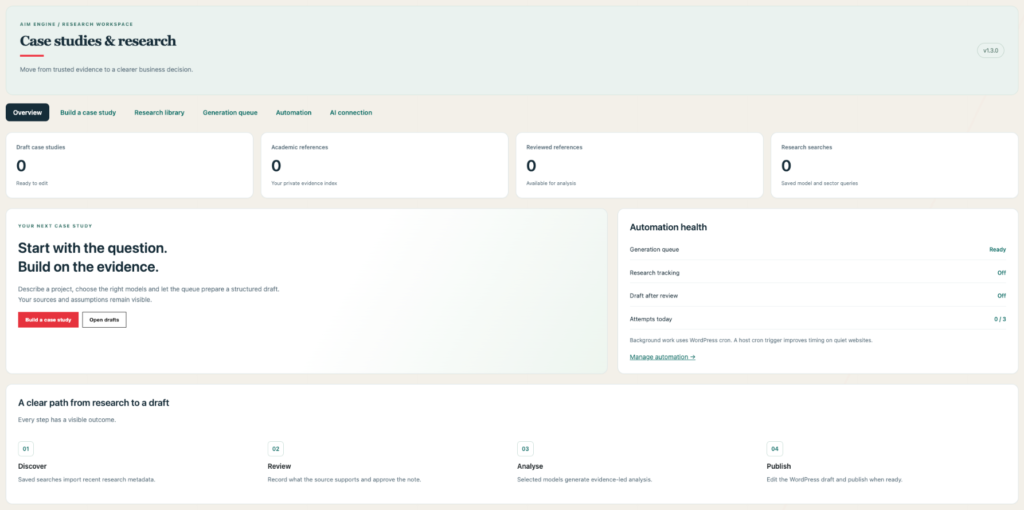
Analyses are processed in a background queue rather than requiring the administrator to treat generation as a finished editorial action. The redesigned workspace provides overview metrics and separate tabs, with queue progress states and draft links available for monitoring.
Several controls help manage submissions:
- Duplicate checks: Matching jobs can be reused to reduce duplicate submissions.
- Retries: Temporary generation failures can be retried within a three-attempt limit.
- Pause: Generation can be paused, although running jobs may finish afterward.
- Daily attempt limits: The default is three processing attempts, configurable from one to 20, resetting at midnight UTC.
These controls should not be interpreted as a promise of a particular number of completed drafts. Processing attempts and finished, approved articles are different things. API charges may apply, and a daily attempt limit is not a monetary budget.
Keep research scheduling separate from generation timing
The generation queue uses a five-minute WordPress cron worker. Actual timing depends on site traffic and hosting, so queued work should not be planned around an exact completion promise.
The research tracker has a different schedule. Its optional hourly WordPress cron process handles one due search, and each saved search becomes due after 24 hours. Research discovery and case-study generation are therefore separate processes, even when reviewed evidence connects them.
For time-sensitive work, the practical recommendation is to check progress and leave room for source review, a failed attempt and editing. The software’s scheduling controls support a workflow; they do not guarantee an editorial deadline.
Enable evidence-review automation selectively
Draft generation after evidence review is optional and disabled by default. To use it, configure the reusable application brief, chosen models and daily attempt limit, then enable the automation.
This can be useful when approved evidence notes repeatedly feed a consistent type of analysis. Manual queuing may be more appropriate when each project needs a different audience, model selection or commercial framing. The trade-off is between reducing repeated submission work and preserving deliberate control over each brief.
Developer hooks are available for AI providers and draft hand-offs. They are connection points, not evidence that any particular external integration is already complete.
Keep a publication checklist outside the automation decision
Before publishing, an editor should check source accuracy, the separation of evidence from assumptions, information gaps, limitations and the proposed action plan. Numerical scenarios require particular care: they calculate monthly revenue and operating result from supplied figures, not a valuation, complete investment appraisal or guaranteed forecast.
The next action is to validate one end-to-end draft, then decide which repeated steps genuinely warrant automation. AIM Case Study & Research Library supplies queue management and evidence-led draft preparation while leaving final wording, references and publication under human control. All copy requires editorial review, and no generation setting establishes that an article is accurate, effective or ready to publish.
AIM Tools promotional article. Explore AIM Case Study & Research Library and membership access.
Help shape the next version
Share a question, experience or useful evidence about this article. Responses are held privately for editorial review, not published as testimonials.
Add an example, conclusion or question.
Short, specific responses help AIM Community improve future articles and product decisions.