
 AIM EngineCREATE · AUTOMATE · AMPLIFY
Start with a review of your published content and a conservative linking limit—not an assumption that every page needs more links. AIM Internal Links – Auto Linking & Repair v1.4.1 scans WordPress content, identifies relevant linking phrases and adds contextual links to suitable pages when content is displayed. It does not require an AI API key, and original post text stays intact.
For administrators managing a growing content library, the practical appeal is straightforward: content discovery, generated-link visibility and link-health review sit in one standalone dashboard. The software handles the scanning and contextual insertion, while an administrator remains responsible for deciding whether the resulting connections are useful.
How content-based linking works
AIM Internal Links analyses published posts, pages, products and public custom content types on the current WordPress installation. It extracts phrases from titles, headings, descriptions, categories and repeated body text rather than requiring you to enter a keyword list manually.
That gives teams a way to connect existing material without opening every post to add links by hand. The possible benefit is easier movement between related pages, provided the source content and destination genuinely address connected topics. Phrase extraction is a starting point for that relationship, not evidence that every suggested connection deserves equal prominence.
What stays protected during insertion
The plugin avoids self-links and duplicate generated destinations. During contextual insertion, it preserves existing anchors, headings, code and form content. You can also exclude selected content and set a limit of 1–10 new contextual links per page; the default is three.
These controls help keep automatic linking bounded. They do not remove the need to read representative pages after activation. A destination can be technically suitable yet still be a weaker editorial choice than another page.
A practical rollout for a WordPress content library
1. Check the operating requirements
The release requires WordPress 6.2 or later, PHP 7.4 or later with DOM/php-xml enabled, and database permissions to create its index and audit tables. Dashboard access requires a WordPress administrator account. Background scans depend on WP-Cron/site visits or a server cron runner.
Content must be displayed through the standard WordPress main-content filter. If your site uses another display path, do not assume that the described contextual insertion will appear there. Working same-site HTTP access is also required for destination verification.
2. Scan before judging coverage
Upload the ZIP through WordPress > Plugins > Add New > Upload Plugin, activate it and open Internal Links in the main admin menu. Allow the automatic scan to run, or select Scan website now.
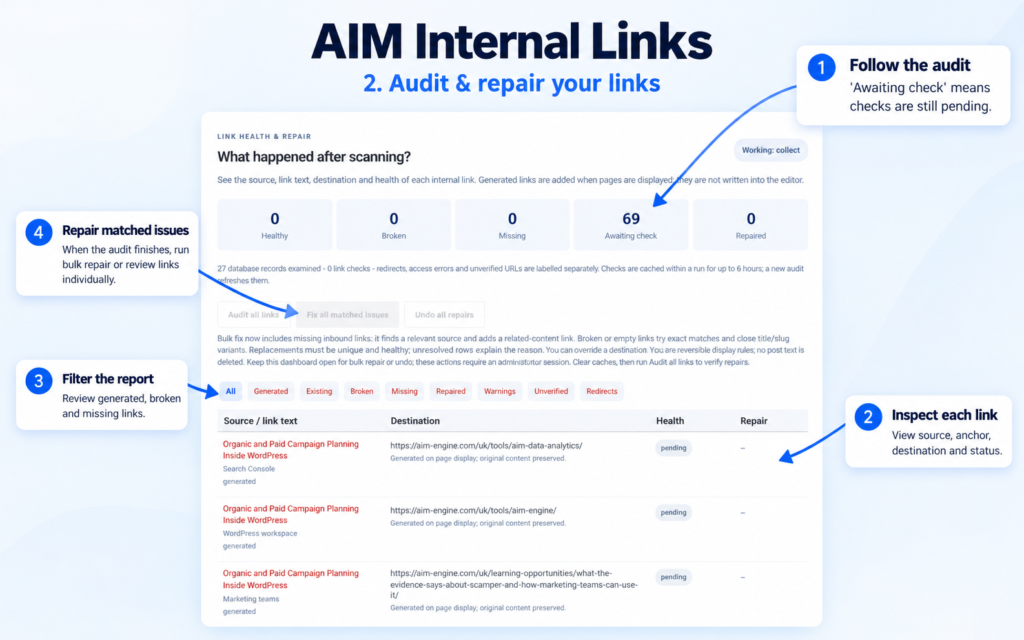
Review the report beneath the scanner to understand source pages, anchor text, destinations, link types and statuses. Keep observations separate: a generated contextual link, an existing link and a destination warning are different things to evaluate.
3. Choose a restrained linking limit
A sensible recommendation is to begin with the default limit of three or a lower setting, then inspect a representative selection of short and long pages. The release permits up to ten new contextual links per page, but a higher setting is not automatically a better editorial choice.
Use exclusions where a page should not participate. The plugin also respects known Yoast/Rank Math noindex metadata for generated targets. That is a specific target-selection safeguard, not a claim that either external product is fully configured or that all indexing conditions have been assessed.
Hypothetical example: connecting a product education library
Hypothetical example: A WordPress site has a product page, a setup guide and several troubleshooting articles. The team wants visitors reading a troubleshooting article to find the relevant setup guidance without manually maintaining keyword rules.
AIM Internal Links can extract relevant phrases from the available content and add contextual links to suitable pages. The administrator then reads the displayed article and checks that the destination answers the reader’s likely next question. If a page should not be used, the team can apply an exclusion rather than simply increasing or decreasing link volume across the site.
This workflow could make related material easier to discover if the matches are relevant and the content display meets the plugin’s requirements. It does not establish a ranking or conversion improvement.
Keep the automation under editorial supervision
The plugin reindexes edited or published content and runs a daily content sweep. Those updates support ongoing maintenance, but administrators should still review linking after meaningful content changes.
The release facts provide no traffic studies, ranking results or customer performance metrics. Treat the initial rollout as an editorial and technical check: inspect relevance, confirm displayed links and use the audit to identify unresolved issues. All copy and contextual link choices require editorial review. The next useful action is to scan the site, inspect a representative sample and adjust controls based on what is actually displayed.
AIM Tools promotional article. Explore AIM Internal Links – Auto Linking & Repair and membership access.
Add an example, conclusion or question.
Short, specific responses help AIM Community improve future articles and product decisions.